Student / community
TeamPass Deployment and Integration for LCSP
The lab's password manager, in internal production, deployed with Docker Compose and tied to Active Directory over LDAPS.
My contribution
Deployed and integrated TeamPass into the LCSP environment, including service containerization, Active Directory integration over LDAPS, and work on user authentication and directory lookup. I am also working on making the deployment more reproducible and version-controlled.
Highlights
- Containerized deployment — Docker Compose and MariaDB
- Sign-in with the lab's Active Directory accounts, over LDAPS
- Active Directory groups mapped to TeamPass roles
Goal
Give the lab a shared password manager tied to its directory, to centralize administrative access: virtualization, network, services and technical accounts. TeamPass is in internal production and is mostly used by the infrastructure team.
Why TeamPass
A free solution that meets the lab’s needs, especially for directory integration over LDAPS.
Implementation
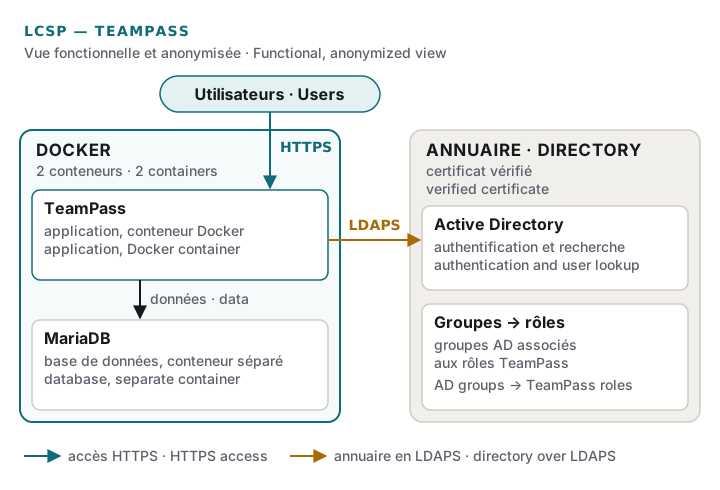
The service is containerized with Docker Compose and backed by a MariaDB database. The provided Compose file did not work as-is in our environment: it had to be diagnosed and adapted before going live, over HTTPS.
Authentication uses the lab’s Active Directory. The connection to the directory goes over LDAPS, with certificate chain validation: it is encrypted and the server certificate is verified. Users are searched and imported from the directory, and their Active Directory groups are mapped to TeamPass roles.
Work in progress
Making the deployment reproducible: describing and versioning it in GitLab, with an external database for the service as the target. This work is not finished.