Academic
Fleetman — Deploying a Microservices Application on Kubernetes
Deploying and adapting an existing microservices application to a multi-node Kubernetes cluster as a two-person project — manifests, persistence, replication and tolerance to losing a node.
My contribution
A two-person project in which I did most of the technical work: the Kind cluster configuration, the Kubernetes manifests, persistence, service exposure, replication, cross-namespace troubleshooting and PowerShell automation. We then validated together how the application behaved when a worker node was lost.
Highlights
- An application built for Docker Compose, rewritten as Kubernetes manifests
- Critical components replicated, loss of a worker node tested
- A cross-namespace communication failure diagnosed and fixed with ExternalName Services
- Deployment, teardown and day-to-day operations automated in PowerShell
Goal
Fleetman is a microservices fleet-tracking application, provided by the course and built for Docker Compose. The task was to deploy it on a multi-node Kubernetes cluster: write the manifests, isolate the components, persist the data and keep the application available if one of the worker nodes goes down. The brief was about deployment and operations, not about developing the application.
Architecture
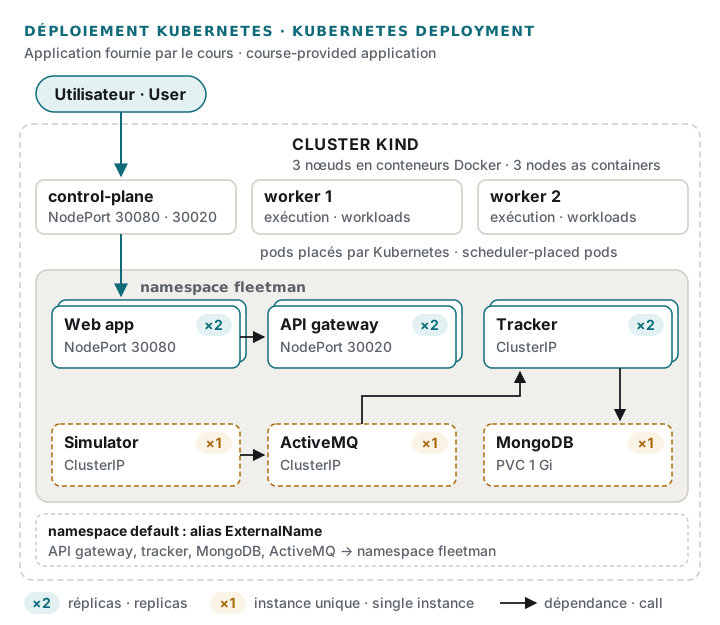
The cluster is built with Kind: one control-plane node and two workers, each running as a Docker container. It is a genuine multi-node Kubernetes cluster, but a lab one — not a production environment.
The application runs in a dedicated namespace. It is made of a position simulator, an ActiveMQ message queue, a service that consumes those positions and stores them in MongoDB, an API gateway and the web front end. Each component has its own Deployment and Service: ClusterIP for internal traffic, NodePort to expose the web front end and the API gateway outside the cluster. MongoDB data is kept on a persistent volume (PersistentVolumeClaim).
Replication and losing a worker
The web front end, the API gateway and the position-tracking service each run as two replicas spread across both workers. Losing a worker was tested: the replicated components keep serving the application from the remaining node.
This tolerance does not cover everything. MongoDB and ActiveMQ remain single instances (MongoDB on a single persistent volume). These are accepted limits of the project, not a fully highly available architecture.
Troubleshooting: broken communication between namespaces
After the application was moved into its dedicated namespace, the web front end could no
longer reach the API. The cause: some dependencies were still referenced in the default
namespace, where those services no longer existed, which broke communication between
components. I created ExternalName Services in default that point to the real services
in the dedicated namespace — first for the API gateway, then for the other affected
services. A second issue came from the image version used for the web front end, which was
meant for Docker Compose: switching to the right version got it working under Kubernetes.
Automation
Beyond the brief, I wrote three PowerShell scripts that were presented with the project: one creates the cluster and deploys the application in order, one tears the environment down, and a menu brings together deployment, teardown and status checks. The project can be rebuilt reproducibly with a single command.