Academic
MedSearch — Highly Available Microsoft Infrastructure
A highly available Windows Server infrastructure designed and deployed as a two-person project — a two-node Hyper-V cluster, shared iSCSI storage, Active Directory and integrated services.
My contribution
A two-person project in which I handled most of the design, deployment and technical integration. I built the nested virtualization setup, the Hyper-V cluster, the shared storage and the main Windows Server services, then validated the live migration and failover scenarios.
Highlights
- Two-node Hyper-V failover cluster, with a file share witness for quorum
- Shared iSCSI storage exposed as a Cluster Shared Volume
- Live Migration and VM failover between the two hosts, both tested
- New IIS sites deployed from a generalized virtual machine template
Goal
Design the Microsoft infrastructure of a fictional company spread over two sites and run by a single administrator: easy to operate, highly available and ready for future services. The brief covered high availability, IIS website hosting, monitoring, remote administration and communication between the sites.
A constraint: Hyper-V on top of Proxmox
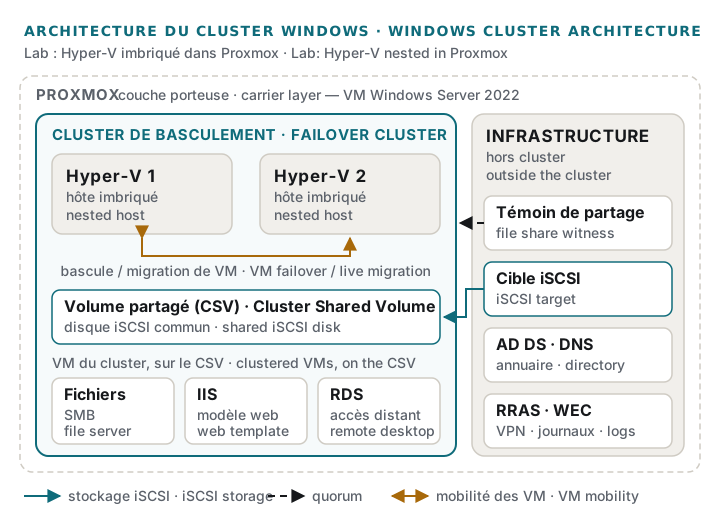
The brief required Hyper-V, but the available hardware — machines from my homelab — was already running Proxmox. Rather than reinstalling it, I went with nested virtualization: Proxmox provides Windows Server 2022 virtual machines with hardware virtualization exposed, and Hyper-V runs inside them. Proxmox is only the underlying layer; the cluster, the service virtual machines and high availability are built entirely with Microsoft tooling. Double virtualization costs performance: this is a lab architecture, presented as such, not a production design.
Architecture
The foundation is three Windows Server 2022 servers: an infrastructure server, which notably hosts the directory and the shared storage, and two Hyper-V hosts belonging to the same failover cluster. Active Directory, DNS and DHCP provide the domain’s directory, name resolution and addressing. Management, storage and virtual machine traffic run on separate networks.
Hyper-V cluster and shared storage
The infrastructure server exposes a disk to both hosts over iSCSI; that disk is turned into a
Cluster Shared Volume, which stores the virtual machines and is reachable from both nodes.
Quorum relies on a file share witness, which breaks the tie if one of the two nodes goes
away. The setup was validated with Test-Cluster before the cluster was created.
The service virtual machines live on that volume and are configured as highly available. Two scenarios were tested: Live Migration of a running machine from one host to the other, and a real failover of a virtual machine between the two hosts.
Services
- File server: SMB shares for domain users.
- IIS: a template machine, prepared with IIS and then generalized with Sysprep, makes it possible to deploy a new site without a full reinstall. A domain client machine was used to check the published site.
- Remote administration: Remote Desktop Services (RDS) and VPN (RRAS), which also links the sites together.
- Monitoring: centralized event log collection (WEC / WEF).
Automation
The main steps are scripted in PowerShell: Active Directory installation, the iSCSI target, cluster validation and creation, the shared volume, creating the virtual machines and making them highly available, VPN installation, and infrastructure checks.
A known weak point
The shared storage depends on a single iSCSI server: if it restarts, the shared volume goes offline and the virtual machines stop. I documented the recovery procedure — reconnecting the initiators, bringing the volume and the witness back online, restarting the machines. In production, this single point of failure would call for redundant storage.
What is not published
Machine names, addressing, network layout and homelab hardware are not detailed here.